HisabKarle turns screenshots into spending you can read
Upload a PhonePe, GPay, or Paytm payment screenshot — or a bank debit SMS from Messages. We detect the format automatically, pull out the merchant, amount, and date, then sort it into categories.

- Apps & bank SMS
- Extracts in seconds
- Amounts in INR
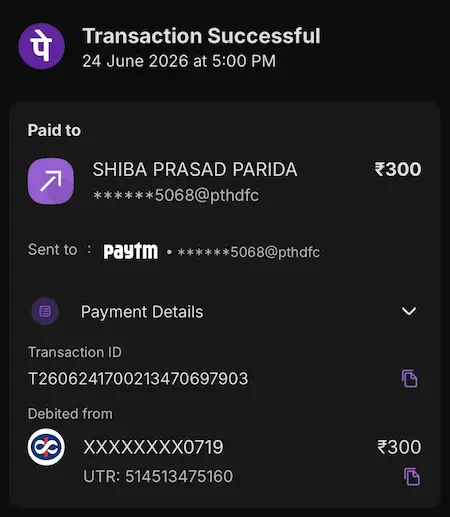
Extracted
₹300
SHIBA PRASAD PARIDA
- UTR
- 261119469890
- Paid from
- XXXXXXXX0719
- Txn ID
- T2606241234567890123456
Upload a screenshot
Payment app or bank SMS
Total spent
₹18,240
This month
₹0
Transactions
10
Categories
₹18,240
Insights
Avg spend
₹1,824 per transaction
Biggest
₹4,500 to Flipkart
Recent
What you get today
A small tool that turns payment app screens and bank debit SMS into a running expense log.
Personal spending
Keep a running log of UPI payments without typing amounts into a spreadsheet.
Shared households
Everyone uploads their own screenshots — one dashboard for the full picture.
How HisabKarle works
Turn payment app screenshots and bank debit SMS into a categorized expense log — no manual typing, no spreadsheet formulas.
Try it nowLogged
₹300
Transfer · 24 Jun 2026
- 1
Pay with UPI
Screenshot the payment success screen (PhonePe, GPay, Paytm) or the debit SMS your bank sends — before you close it.
- 2
Drop it here
Upload the image — we auto-detect app vs SMS and read the merchant, ₹ amount, and date.
- 3
Review your log
Check the expense list and monthly category totals whenever you want a pulse on spending.
How much could you track each month?
Adjust the sliders to match your UPI habits. HisabKarle turns each screenshot into a categorized expense — this is a rough preview of what your dashboard could look like.
Estimated monthly total
₹5,400
From 12 UPI payments at ~₹450 each
Likely category split
Start tracking with HisabKarle
Keep a screenshot from your last transfer handy, open the dashboard, and see how fast a single payment becomes a tracked expense.
- Apps & bank SMS
- No account required
- Under a minute per upload